Starting Excel without an Empty Workbook
For example, if you usually launch Excel by clicking a shortcut on your desktop, you can modify the shortcut as follows:
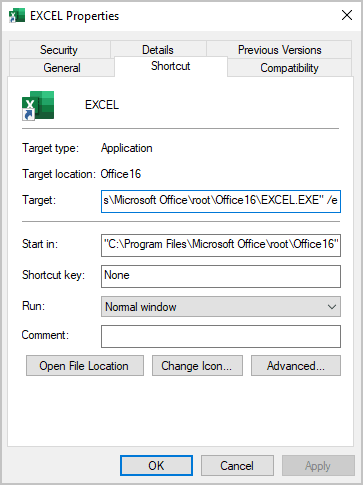
1. Right-click the shortcut icon and choose Properties.
2. In the Properties dialog box, select the Shortcut tab.
3. Edit the Target field by adding a space, followed by /e, to the end. For example:
"C:\Program Files\
4. Click OK.
After making that change, Excel will not display an empty workbook when it is started by clicking that shortcut icon.
See also Opening workbooks automatically.
See also this tip in French: Comment démarrer Excel sans un classeur vide.