Rule to move all correspondence on some subject to the specific folder
Use the following steps to create this rule:
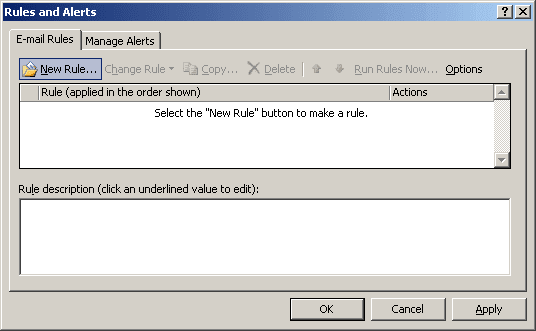
1. Select Tools -> Rules and Alerts... to display the Rules and Alerts dialog box.
2. In the Rules and Alerts dialog box, choose New Rule....
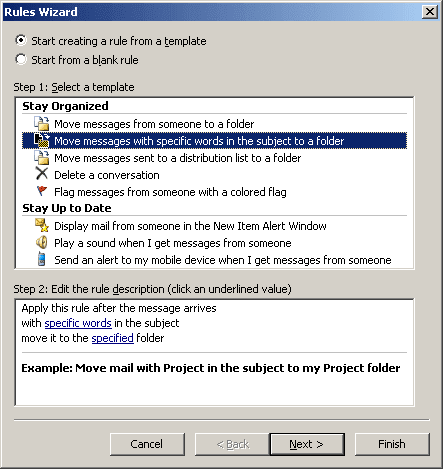
3. Choose the Move messages with specific words in the subject to a folder option, click Next.
4. Choose the condition with specific words in the subject and click specific words in the Step 2 text box, add SAP to the search text:
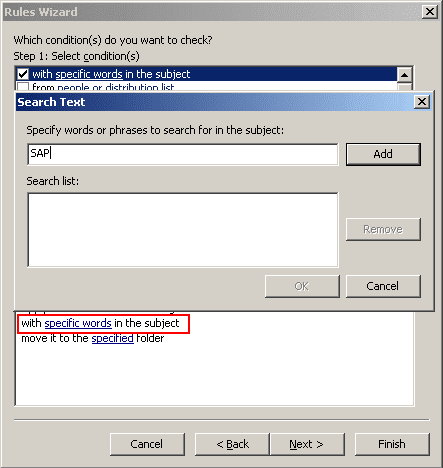
5. Click OK when you finish adding the phrases to the search text and then click Next to choose your action.
6. Choose move it to the specified folder in Step 1 and click specified in Step 2 and choose SAP project folder, click Next:
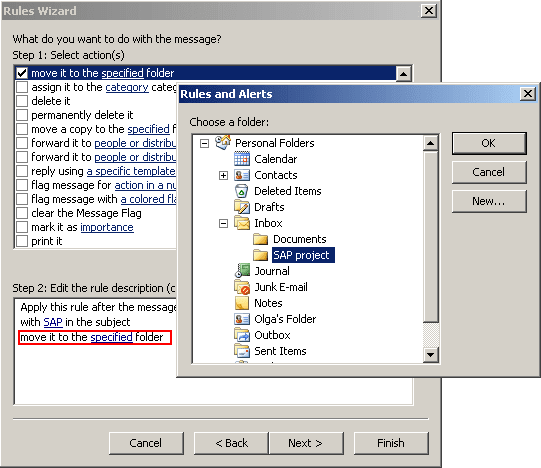
7. You probably don't want any exceptions, so click Next again, name your rule, and click Finish.