Opening workbooks automatically
You can find XLStart folders in:
C:\Documents and Settings\
or:
C:\Program Files\
Any workbook files (excluding template files) stored in either of these XLStart folders open automatically when Excel starts. If one or more files open automatically from an XLStart folder, Excel won't start with a blank workbook.
You can specify an alternate startup folder in addition to the XLStart folder, do the following:
1. Select Tools -> Options....
2. In the Options dialog box, on the General tab, enter a new folder name in the At startup, open all files in field:
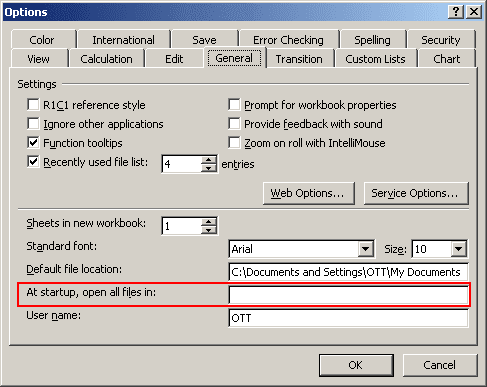
Then, when you start Excel, it automatically opens all workbook files in both the XLStart folders and the alternate folder that you specified.