How to sum cells by criteria
Excel
2003
Use SUMIF if you need to sum values for a particular person or other criterion.
To sum cells by criteria, do the following:
1. Select the cell that will contain the result.
2. Do one of the following to open the Insert Function dialog box:
- Select Insert -> Function...
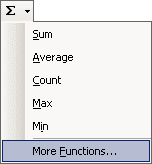
- Click the Sum button in the Standard toolbar and then select More Functions...:
- Click the Insert Function button
 in the left of the edit bar:

3. In the Insert Function dialog box:
- select Math & Trig in the Or select a category listbox
- select SUMIF in the Select a function list
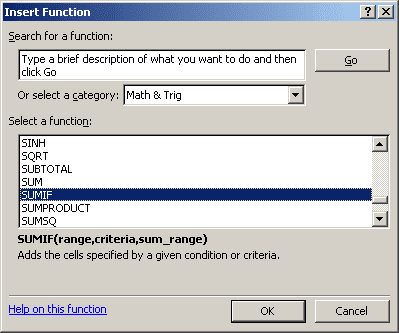
Then press OK.
4. In the Function Arguments dialog box, fill following fields:
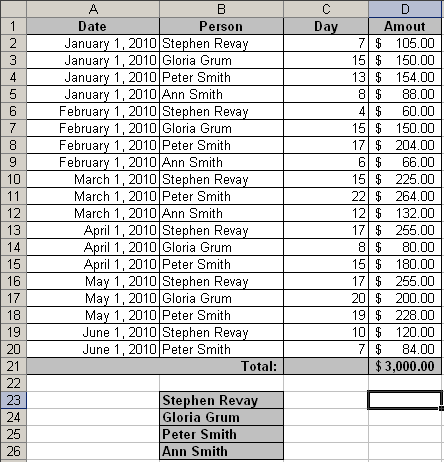
- The Range field determines the range of cells Excel will look to perform the count in. In this example the cell range is B2:B20.
- The Criteria is a conditional statement that is similar to the conditional statement in the IF statement.
- The Sum_range field tells Excel which cells to add when the criteria is met for each cell in the range. In this example the cell range is D2:D20
5. Press OK.
Note: You can enter this formula using keyboard, for this example:
= SUMIF (B2:B20, "Stephen Revay", D2:D20)
Notes:
- You can use the wildcard characters, question mark (?) and asterisk (*), in criteria. A question
mark matches any single character; an asterisk matches any sequence of characters. If you want to
find an actual question mark or asterisk, type a tilde (~) before the character. For example:
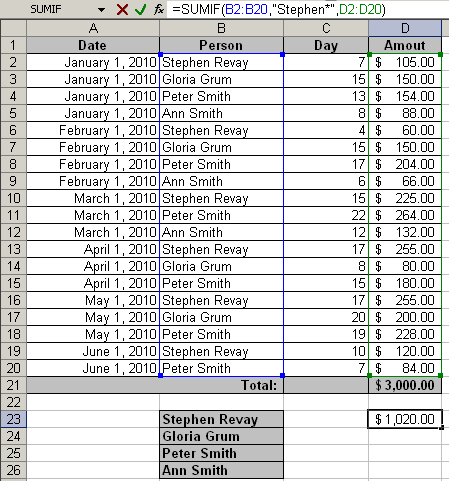
- Microsoft Excel provides additional functions that can be used to analyze your data based on a
condition or criteria:
- To count the number of occurrences of a string of text or a number within a range of cells, use the COUNTIF function (see How to count cells by criteria for more details).
- To have a formula return one of two values based on a condition, use the IF function.
- To analyze data in a list based on criteria, such as profit margins or product types, use the database and list management functions (DCOUNT, DCOUNTA, DSUM etc.).