How to change cells format easily
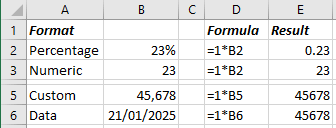
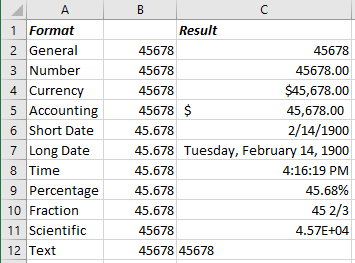
For example, the number 23 in a cell with a percentage format will be stored as 0.23 float, while in a cell with the numeric format as 23 integers. The number 45,678 when using commas to separate thousands, Excel will store as 45 thousand and 678, while in a cell with the data format, you will most likely see 1/21/2025 (see how to adjust the number of digits after the decimal point):
To apply the format to the selected cell or range of cells, do the following:
- Using the keyboard:
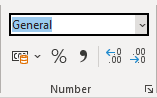
- On the Home tab, in the Number group, open the Number Format dropdown list:
From the Number Formats dropdown list:
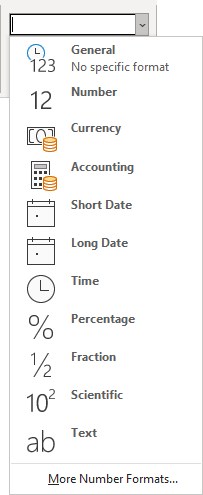
- Choose one of the 11 common number formats (see below),
- Select the More Number formats... to create a custom format (see Custom cell format for more details):
- Do one of the following:
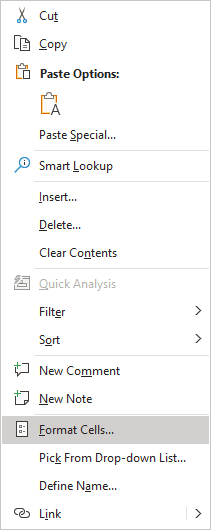
- Right-click on the selection and choose Format Cells... in the popup menu:
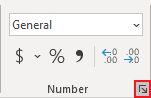
- On the Home tab, in the Number group, click the dialog box launcher:
In the Format Cells dialog box, on the Number tab, in the Category list:
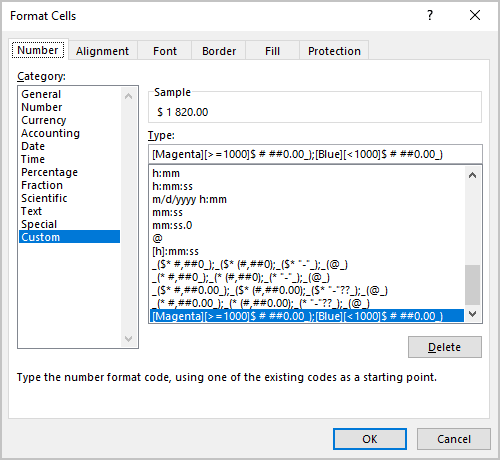
- Choose one of the 11 predefined formats,
- Use the Custom format (see Custom cell format for more details).
- Right-click on the selection and choose Format Cells... in the popup menu:
- Using the mouse: Number-Formatting Keyboard Shortcuts:
Key Combination Formatting Applied Ctrl+Shift+~ General number format (that is, unformatted values) Ctrl+Shift+$ Currency format with two decimal places (negative numbers appear in parentheses) - see how to change the currency format Ctrl+Shift+% Percentage format, with no decimal places Ctrl+Shift+^ Scientific notation number format, with two decimal places Ctrl+Shift+# Date format with the day, month, and year - DD-MM-YYYY Ctrl+Shift+@ Time format with the hour, minute, and AM or PM Ctrl+Shift+! Two decimal places, thousands separator, and a hyphen for negative values:
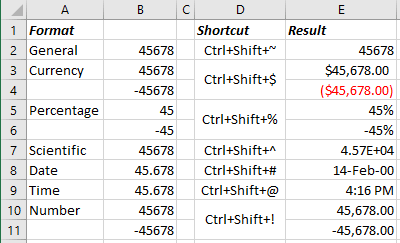
Note: The number format does not affect the value. It affects only the appearance. See also Different rounding effects in Excel.
Number formats
- General (used by default) displays numbers as integers or decimals and in scientific notation if the value is too wide to fit in the cell.
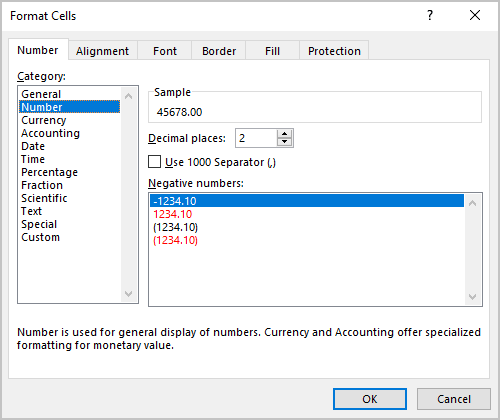
- Number allows to specify:
- the number of decimal places,
- whether to use a comma to separate thousands,
- how to display negative numbers - with a minus sign, in red, in parentheses, or in red and in parentheses:
- Currency allows to specify:
- the number of decimal places,
- whether to use a comma to separate thousands,
- a currency symbol,
- how to display negative numbers - with a minus sign, in red, in parentheses, or in red and in parentheses.
- Accounting differs from the Currency format in that the currency symbols always align vertically (see more about differences between currency and accounting formats).
- Date allows selecting one of several date formats.
- Time allows selecting one of several time formats.
- Percentage allows specifying the number of decimal places and always displays a percent sign.
- Fraction allows selecting from among nine fraction formats.
- Scientific displays numbers in exponential notation - with letter E or e: 2.00E+08 = 200,000,000; 1.02E+05 = 102,000.
You can choose the number of decimal places to display to the left of E. The second example can be read as "1.02 times 10 to the fifth."
- Text allows specifying a value that causes Excel to treat it as text, even if it looks like a number.
This feature is useful for such items as serial numbers, credit card numbers, or document numbers.
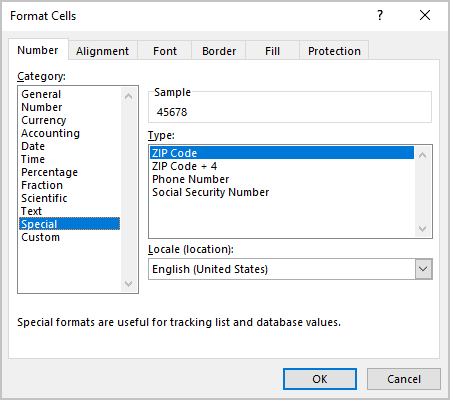
- Special contains additional number formats.
In the U.S. version of Excel, the additional number formats are Zip Code, Zip Code + 4, Phone Number, and Social Security Number:
- Custom enables to define custom number formats – see Custom cell format for more details.
Note: If a cell displays a series of hashes such as #########, this usually means that the column width is not wide enough to display the value in the selected number format. To display the value correctly, change the column width (see How to change width of gridlines in Excel) or change the number format.
The series of hashes can also indicate a negative time value (see How to format negative timestamps) or an invalid date, such as a date before January 1, 1900.
See also this tip in French: Comment changer le format de numéro facilement.